
Showing posts with label Creativity. Show all posts

Tuesday, October 20, 2026

Shapegrams

WEBSITE ↬ Shapegrams

AUDIENCE ↬ teachers

CONTENT ↬ all

GRADE LEVELS ↬ 2nd gr & up

Shapegrams are a perfect digital art group of lessons. They are the brainchild of Tony Vincent. He has created these little lessons - all geared to building up your students creativity and tech skills. They are even leveled so you can help build your students skills from basic to more advanced.  


HOW CAN TEACHERS USE THIS RESOURCE?
I can see teachers getting a subscription and using Shapegrams in their classes as short little side "quests". If you are an art teacher, they can become so much more! Classroom teachers might pull Shapegrams that match up to the current unit or have them available for your "fast finishers" or even when you find a handful of minutes left in your plans.


***
Interested in more resources like this? Every Monday, I share a newsletter with a collection of Tech You Can Do resources. Interested? Sign up here!  ***

Thursday, August 27, 2026

Wheel of Careers

WEBSITE ↬ Wheel of Careers: Get This Interactive Exploration Activity for Teens

AUDIENCE ↬ teachers

CONTENT ↬ career

GRADE LEVELS ↬ 6-12

If you teach middle or high school, I'm willing to bet the subject of future careers has come up in your classroom. Whether you are a content teacher or a special areas teacher, talking with teens about future careers has become a norm, but I don't feel like it always has a strong support or good activities to help teachers. This Wheel of Careers can help!  


HOW CAN TEACHERS USE THIS RESOURCE?
I can see teachers using this as a group guessing game to prompt students to discuss how skills learned in school (math, science, communication) apply to real-world roles. Or dig deeper by using the provided link to a FREE Everfi course to further explore a career path of the students choosing. This can tie into most content areas!


***
Interested in more resources like this? Every Monday, I share a newsletter with a collection of Tech You Can Do resources. Interested? Sign up here!  ***

Tuesday, May 12, 2026

FontBolt

WEBSITE ↬ FontBolt

AUDIENCE ↬ teachers & admins

CONTENT ↬ all

GRADE LEVELS ↬ all grades

I love fonts. I love sites that provide "fun" fonts. This resource is entirely just FUN! Even just browsing and looking at the fonts available is fun ... which are your favorites? Where will you use one - at school? at home? 

And if you like this one, check out my Fonts Wakelet collection for more sites about fonts.

Thank you, Eric Curts, for sharing this!


HOW CAN TEACHERS ANYONE USE THIS RESOURCE?
I can see everyone using this site to create lots of different items .... not exclusively for school. Maybe a custom t-shirt? Maybe a flyer for a community group you work with? Maybe for helping your own child on a project? Have fun!


*** 
Interested in more resources like this? Every Monday, I share a newsletter with a collection of Tech You Can Do resources. Interested? Sign up here!  ***

Tuesday, April 7, 2026

70 Free and Easy Directed Drawing Activities Anyone Can Do

WEBSITE ↬ 70 Free and Easy Directed Drawing Activities Anyone Can Do

AUDIENCE ↬ teachers

CONTENT ↬ any & all

GRADE LEVELS ↬ all grades

Hear me out ... April begins our month of testing (it at least feels like it lasts all month ...) so there will be plenty of required time in a very structured learning environment. How about planning for some non-heavy focused activities? Without losing the benefit of creativity and practicing those following directions skills, how about some directed drawing activities? To the tune of 70???

Let's give our students brains a little bit of a break from the testing environment without there being a free-for-all. I see kids, even the little ones, shying away from drawing. That makes me sad ... doodling and drawing is a fantastic way to relax, and I see our kids shying away from it. Let's give it back to them.  


HOW CAN TEACHERS USE THIS RESOURCE?
I can see teachers using this in the short breaks of time. None of these have to be super intense or with the idea that you are encouraging the next Picasso (but wouldn't that be amazing???). Let's give our students space to try out drawing, but with some guidance. Enjoy!


*** 
Interested in more resources like this? Every Monday, I share a newsletter with a collection of Tech You Can Do resources. Interested? Sign up here!  ***

Tuesday, March 17, 2026

150 Inspiring Picture Writing Prompts To Spark Creativity

WEBSITE ↬ 150 Inspiring Picture Writing Prompts To Spark Creativity

AUDIENCE ↬ teachers

CONTENT ↬ ELA (writing)

GRADE LEVELS ↬ all grades

I made a super smart choice this year and I subscribed to the We Are Teachers daily newsletter. This is a gem that was shared in one of them ... and as a former ELA teacher, I love it! Ok, I only taught ELA for a few years, but I know a good resource when I come across it.   


HOW CAN TEACHERS USE THIS RESOURCE?
I can see teachers using this as a starter to spark student creativity and just be in the habit of writing. It could also do nicely to focus students in on specific writing tasks like dialog, how to's, character descriptions, persuasion, and so much more that I am not super in tune with. Students can also swap and practice proofreading and peer reviews after doing the writing. 


*** 
Interested in more resources like this? Every Monday, I share a newsletter with a collection of Tech You Can Do resources. Interested? Sign up here!  ***

Tuesday, August 5, 2025

SNO Sites

WEBSITE ↬ SNO Sites

AUDIENCE ↬ teachers

CONTENT ↬ writing / journalism

GRADE LEVELS ↬ 9-12

Do you teach journalism or writing with high schoolers? If so, this is the website for you and your students. SNO is an all-in-one platform that offers technology, service, and training to support student media programs online. They have WordPress websites with the FLEX theme, managed hosting, mobile apps, and workflow management tools (FLOW). The service also includes training resources and professional support tailored for student media, serving both college and K-12 news sites.  


HOW CAN TEACHERS USE THIS RESOURCE?
I can see teachers using this in their news and journalism class. This will allow for easy and professional sharing of school news. It does come with a cost, but it is definitely worth looking into!


*** 
Interested in more resources like this? Every Monday, I share a newsletter with a collection of Tech You Can Do resources. Interested? Sign up here!  ***

Wednesday, May 7, 2025

Lego Cards for Inspiration and Creation

WEBSITE ↬ Lego Cards for Inspiration and Creation

AUDIENCE ↬ teachers

CONTENT ↬ all

GRADE LEVELS ↬ all grades, mainly elementary

I found this little nugget last summer and used it when I taught a summer camp. It was awesome! Only two things are required ... the cards printed and Legos. And my campers loved when I pulled them out. The cards provide "simple" challenges and the creativity is endless. 


HOW CAN TEACHERS USE THIS RESOURCE?
I can see teachers using this as a brain break or a station for students. 


*** 
Interested in more resources like this? Every Monday, I share a newsletter with a collection of Tech You Can Do resources. Interested? Sign up here!  ***

Tuesday, December 17, 2024

5 Clue Challenge

WEBSITE ↬ 5 Clue Challenge

AUDIENCE ↬ students

CONTENT ↬ research

GRADE LEVELS ↬ middle school & high school

I remember hearing about the 5 Clue Challenge years ago, but I somehow lost track of it only to be stumble upon it again recently. It is just as fun as I remember! Michael Soskil created this idea to encourage students to practice research skills and have a little fun along the way. The way it works is you watch the video and use the clues in the video to help you research. The quicker you can guess the location the more point you earn.  


HOW CAN TEACHERS USE THIS RESOURCE?
I can see teachers using this as a warm up for class or even when you find that you have a few extra minutes. For more of a challenge, you can team students up to work together or make it into an individual challenge. After your students are comfortable, you might even encourage them to create their own 5 clue challenge to share with the class.


*** 
Interested in more resources like this? Every Monday, I share a newsletter with a collection of Tech You Can Do resources. Interested? Sign up here!  ***

Tuesday, July 30, 2024

Doodle3D

WEBSITE ↬ Doodle3D

AUDIENCE ↬ students

CONTENT ↬ 3D drawing; art

GRADE LEVELS ↬ any ... for beginners with 3D printing

New to 3D printing? Want to provide your students the opportunity to create or draw digitally but in a whole different way? Then you simply must check out Doodle3D. This FREE - and non-account required - website will allow your students the ability to draw and have it turn into a 3D version. 

This website can also be used as a "free time" activity or in conjunction with a content area for your students to design and draw freely.   


HOW CAN TEACHERS USE THIS RESOURCE?
I can see teachers using this if they teach an intro to 3D printing and design class or if 3D printing is part of a course. Another way teachers can use this is as a free time activity for students to exercise their creativity. 
For more information, feel free to check out this great article from TCEA & Peggy Reimers: https://blog.tcea.org/doodle3d-transform/


*** Every Monday, I share a newsletter with a collection of Tech You Can Do resources. Interested? Sign up here!  ***

Tuesday, December 12, 2023

Icograms Designer: Education edition

WEBSITE ↬ Icograms Designer: Education edition

AUDIENCE ↬ teachers & students

CONTENT ↬ design, STEM

GRADE LEVELS ↬ grades 7 & up

Let's be honest ... there are a LOT of tools out there. Icograms Designer will allow you and your students to "Create beautiful 3D looking Maps, Infographics and Isometric Illustrations within minutes" as their homepage states. And yes! They are beautiful!!! Wow! 

The link I've shared is their education edition - which I wasn't initially aware of, but while checking out their page, I noticed a link in the lower corner. 

Icograms Designer is a "freemium" which means it can be used without paying, but you will be limited in the number you make as well some of the items you have access to.


HOW CAN TEACHERS USE THIS RESOURCE?
I can see teachers using this with older students - it's not the easiest and will take some learning on your students' part. Teachers can create classes and student accounts and then see submissions and give feedback.

Be sure to check out their tutorials page and their lessons. If this tool is right for you & your students, there is some help and guidance. 


*** Every Monday, I share a newsletter with a collection of Tech You Can Do resources. Interested? Sign up here!  ***

Sunday, September 10, 2023

Puzzlemaker!

WEBSITE ↬ Puzzlemaker!

AUDIENCE ↬ teachers

CONTENT ↬ all

GRADE LEVELS ↬ all grades

Puzzles might not be everyone's idea of high-impact learning, but they sure can be fun little breaks for all ages. I also believe they push a person to use their brain in a different way, so as long as it's not the only method of learning, puzzles can be great additions to your classroom. Discovery Education shares this FREE website with the ability to make 10 different types of puzzles. 


HOW CAN TEACHERS USE THIS RESOURCE?
I can see teachers using this to create fun activities for students. Brain breaks - teasers - revealing a special surprise - fast finisher activities - puzzles can be used for many reasons in classrooms of all ages. Maybe even allow students to help create them for other students.


*** Every Monday, I share a newsletter with a collection of Tech You Can Do resources. Interested? Sign up here!  ***

Monday, May 1, 2023

AutoDraw

WEBSITE ↬ AutoDraw

AUDIENCE ↬ teachers & students

CONTENT ↬ any & all

GRADE LEVELS ↬ grades 3 & up

I am not great at drawing. I wish I was. I've practiced and tried really hard to be good at it. When I was younger, I would find something I liked and copied it. I wish I had Autodraw ... it allows me to attempt drawing, but then rescues me in guessing what it is that I tried to draw. It's awesome!  


HOW CAN TEACHERS USE THIS RESOURCE?
I can see teachers using this to help themselves when creating resources for their students. Often teachers aren't looking for super fancy graphics and we certainly don't have time to sit and create. Autodraw is an easy - and fast! - way to create them.

Students can use Autodraw to help them create graphics, too. No worries about copyright or using images they aren't supposed to also allowing them to be creative and make custom graphics they can use.


*** Every Monday, I share a newsletter with a collection of Tech You Can Do resources. Interested? Sign up here!  ***

Tuesday, April 18, 2023

Bouncy Balls

WEBSITE ↬ Bouncy Balls

AUDIENCE ↬ teachers & students

CONTENT ↬ all

GRADE LEVELS ↬  K-5

Spring is a tough season to teach. Everyone is comfortable around each other - maybe a little "too" comfortable; the year is winding down, yet it's crazy busy; the weather is getting warmer, but not always enough to enjoy being outside; and let's face it ... we are all tired.

Are you looking for something to introduce to break up your "usual"? I've got it with Bouncy Balls! It's a website you can customize & change based on the day or maybe allowing students to choose the theme and encourage the students to keep noise at a "decent" level. I love how you can have the same number of balls as you have students ... just a cool way of customizing the screen for your students.


HOW CAN TEACHERS USE THIS RESOURCE?
I can see teachers using this website to help encourage students to keep volume at a "decent" level without the teacher having to "shhhh" or interrupt. The kids can visually see how high the balls bounce and hopefully use it as a self-regulation tactic. It's also fun to use different themes ... maybe it's the star student who gets to choose the theme ... maybe it's a reward for something. You can adjust the sensitivity of the volume. Use this to help students visually SEE their noise level.


*** Every Monday, I share a newsletter with a collection of Tech You Can Do resources. Interested? Sign up here!  ***

Saturday, March 4, 2023

CocoMaterial

WEBSITE ↬ CocoMaterial

AUDIENCE ↬ teachers & students

CONTENT ↬ any/all

GRADE LEVELS ↬ all grades

Clipart is a great way to allow students to include images in their work ... but often its tough for students to draw or create the art on a device. CocoMaterial provides exactly what teachers and students need. I'm no artist, but with CocoMaterial, I can search and find what appears to be hand drawn work that I have the ability to download and use in work. Yay!

AND ... no account is necessary! Students can use this, too!


HOW CAN TEACHERS USE THIS RESOURCE?
I can see teachers using CocoMaterial to "spice up" their own presentations or lessons, but even more than that, I can see teachers allowing students to browse CocoMaterial and pull from their more than 2,500 images to add visual interest to the work they are creating.


*** Every Monday, I share a newsletter with a collection of Tech You Can Do resources. Interested? Sign up here!  ***

Tuesday, February 7, 2023

fontspace

WEBSITE ↬ fontspace

AUDIENCE ↬ teachers

CONTENT ↬ any/all

GRADE LEVELS ↬ all grades

This site speaks to my font loving heart! Oh the possibilities!!! If you've ever wished you could have a font that is letters inside of pumpkins ... or letters that look like grass is growing on them ... or letters that look like those puffy stickers ... or you've just wondered "what kind of font can I find to jazz up this presentation?" ... THIS is your site!

With over 100,000 fonts to choose from (yes - I DID put in the right number of zeros!), you will be sure to find the right one for whatever you are doing! Be sure to scroll down and check out the "Best of 2022" & "The Newest" & "Most Popular".


HOW CAN TEACHERS USE THIS RESOURCE?
While you can create an account & download these fonts, you don't have to! I've used this already once and after clicking on the font, you'll find the ability to type words in and then copy & paste them into your file. (I used it to create the title on today's image.) 


*** Every Monday, I share a newsletter with a collection of Tech You Can Do resources. Interested? Sign up here!  *** 


Tuesday, January 24, 2023

Digital "Paper" Snowflakes

WEBSITE ↬ Digital Snowflakes

AUDIENCE ↬ students

CONTENT ↬ math, fun

GRADE LEVELS ↬ grades 2 & up

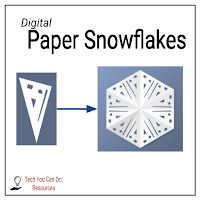
Some websites are just pure fun! This is one of them! As a kid, I loved cutting out paper snowflakes ... you? What if I told you this website allows you to do this digitally??? Yes!!! I made the snowflake in today's image & had a lot of fun doing it!
  
Thanks, Beth Kingsley for sharing this! I can see lots of time spent on this site creating unique snowflakes! (And ... this is a "no mess" activity ... you won't have paper scraps all over your floor!)

HOW CAN TEACHERS USE THIS RESOURCE?
I can see teachers using this in math class for sure! When studying shapes, challenge your students to draw specific shapes - squares, rectangles, triangles. And level it up by giving a certain number of shapes that must be there. And how about challenging them to get their points close enough together to form a circle ... or as close to one they can?

Another option is indoor recess or as a fast finisher activity. 


*** Every Monday, I share a newsletter with a collection of Tech You Can Do resources. Interested? Sign up here!  ***

Tuesday, December 20, 2022

Adobe Creative Challenges

AUDIENCE ↬ teachers

CONTENT ↬ all

GRADE LEVELS ↬ grades 3 & up

Did you know Adobe Creative Cloud is provided freely to K-12 teachers AND their students? It is an amazing suite of creative & design tools. And to make it even better ... they do monthly design challenges to help get "creative juices" going. All you need is found on the site linked above and it changes monthly so you & your students are ALWAYS able to find something to fit your interests.

The challenge that caught my eye was their October challenge - Digital Citizen Hero Cards. Don't be afraid to go back and look at previous challenges. Here's just a couple that also caught my eye:


*** Every Monday, I share a newsletter with a collection of Tech You Can Do resources. Interested? Sign up here!  ***

Sunday, November 6, 2022

KidsCerts.org

WEBSITE ↬ KidsCerts.org

AUDIENCE ↬ teachers

CONTENT ↬ any/all

GRADE LEVELS ↬ all grades

Looking for a quick & easy way to make certificates for many reasons? KidsCerts.org has you covered. Super quick - super versatile - and super cute!  Customize and download and you are in business. If you are pressed for time - or you don't feel like you have the creativity to make your own certificates, give KidsCerts a try!

*NOTE* the site is FREE - an account is required if you want to have access to far more frames, upload your own graphics, and print multiple certificates at one time.


*** Every Monday, I share a newsletter with a collection of Tech You Can Do resources. Interested? Sign up here!  ***


Tuesday, February 15, 2022

Icons Mania

WEBSITE ↬ Icons Mania

AUDIENCE ↬ teachers & students

CONTENT ↬ any/all

GRADE LEVELS ↬ all grades

I am a big fan of SlidesMania & have been for years! Paula is the creator of both and freely shares out these icon collections via both Google & Microsoft.

SlidesMania shares out numerous pre-built Google Slides for both teacher & student use. With IconsMania, Paula shares icons that allow any user - regardless of age - to take and use and or customize to their project. I love these! 

There are icons for everything from tools, to calendars, to history class, to food, sports, and so much more! This is a DEFINITE bookmark!

Thursday, December 2, 2021

Write About

WEBSITE ↬ Write About

AUDIENCE ↬ teachers

CONTENT ↬ ELA focused; cross-curricular activities

GRADE LEVELS ↬ grades 1 & up

I love what I see on Write About. As much as I love teaching, teaching writing was always a challenge. I wanted students to have authentic and enjoyable writing topics for a variety of reasons. With Write About, get ready to have all of that & more!

Touted as "a classroom writing community and publishing platform built by teachers" I don't think it can get any better. So many prompts & ideas; the ability to filter warms my heart; and the fact there is a freemium version so you can really dig in and try it out - yes! Thank you! And one of the highlights? It's not solely geared toward ELA teachers ... there are many prompts for other contents.

Did I mention the prompts are part of the FREE aspect? Yep! And it integrates with Google Classroom! Check it out ... I know you'll love it!